Auto-generate Flow Chart from Java/C++ Codes:

Raptor Flowchart Tutorial For Beginners

Showing posts with label berita. Show all posts

Tuesday, August 15, 2017

Kad Debit Maybank tidak diterima untuk Online Payment? Apa yang harus dilakukan?

Mulai 3hb Ogos 2017, apabila transaksi NON-3D ditolak oleh sistem pada kali pertama ia dilakukan, pemegang kad debit dan prepaid Maybank boleh mengaktifkannya setelah menerima SMS automatik dari sistem pelayan perkhidmatan tersebut. Sila rujuk gambar.

Jika masih tidak berjaya, hubungi 1-300-88-6688.

Sumber: http://www.maybank2u.com.my/mbb_info/m2u/public/personalDetail04.do?cntTypeId=1&cntKey=PRO07.30&programId=HI-Highlights&newsCatId=/mbb/Highlights/2017&chCatId=/mbb/Personal

Tuesday, August 08, 2017

Anda mangsa Ah Long?

ramai mangsa Ahlong mula terjerat kerana menyangka mereka mampu berurusan secara sendiri dengan Ahlong tanpa masalah

Anda Mangsa Ahlong?

Sekiranya anda atau kenalan terjebak dengan Ahlong, segeralah bertindak. Mangsa Ahlong boleh melaporkan aduan kepada kami di PPIM bagi mendapatkan bantuan. Berdasarkan pengalaman kami, ramai mangsa Ahlong mula terjerat kerana menyangka mereka mampu berurusan secara sendiri dengan Ahlong tanpa masalah. Ahlong menggunakan pelbagai taktik licik dan zalim untuk terus memerangkap mangsanya. Ugutan serta faedah yang tidak masuk akal menyebabkan mangsa akhirnya menjadi hamba Ahlong untuk selama-lamanya. PPIM melalui Unit Banteras Ceti Haram telah menyelesaikan ribuan kes Ahlong yang melibatkan nilai puluhan juta ringgit. Kejayaan demi kejayaan dicapai sekaligus membantu pihak berkuasa membanteras Ahlong. Bantuan yang kami berikan meliputi semua lapisan masyarakat tanpa sebarang batasan.

LAPOR


Laporkan aduan anda di Ibu Pejabat PPIM @ No 70X, Jalan Keramat Hujung, Bukit Keramat, 54000 Kuala Lumpur. Pastikan anda telah mendapatkan tarikh temu janji bagi mengelakkan sebarang kesulitan. Untuk sebarang pertanyaan dan tetapan temu janji, sila hubungi no hotline Unit Banteras Ceti Haram PPIM ditalian 013 3071 999 / 019 3458 444.

SIASAT


Pihak pengadu diwajibkan untuk memberi maklumat serta butiran lengkap Ahlong. Pegawai penyiasat akan mendalami dan meniliti kes berdasarkan maklumat yang diberikan oleh pihak pengadu.

Penjenayah Scam Sasar Maybank

Maybank telah menerima laporan tentang panggilan scam dari China

Pesanan dari Maybank:

We have received several reports on phone call scams originating from China.
The usual modus operandi of the syndicates involves two scammers, one would be impersonating as a representative from Embassy of China and another as a police officer from Shanghai Police Department.
The scam starts off with the victim being accused with a criminal offence involving black money syndicate. The victim is then required to follow the instructions and reveal his or her Internet Banking details through the phone. Shortly after, the victim will receive an SMS or WhatsApp message containing a malicious link to download a mobile app. If downloaded and installed, this malicious app would be able to intercept any SMS text messages sent to your mobile phone, which means the syndicate, would be able to obtain your TAC number to perform internet banking transactions without your knowledge.
We strongly advice against revealing any banking details through phone calls or downloading any mobile app from unverified sources. If encountered with this situation, we would advice you to hang up the call immediately and make an official report with us. You may contact our Fraud Hotline at +603-5891 4744 to lodge your report.


Terjemahan Bahasa Melayu:

Kami telah menerima beberapa laporan berkenaan panggilan scam yang datangnya dari negara China.

Modus operandi sindiket biasanya melibatkan dua pemanggil, seorang akan berlakon sebagai wakil kedutaan China manakala seorang lagi sebagai pegawai polis dari Jabatan Polis Shanghai.

Scam bermula dengan tuduhan bahawa mangsa melakukan kesalahan melibatkan sindiket Black Money. Mangsa kemudiannya diminta mengikut arahan dan mendedahkan maklumat Perbankan Internet melalui telefon. Tidak lama selepas itu, mangsa akan menerima mesej SMS atau WhatsApp mengandungi pautan untuk download mobile app. Jika di download dan install, app ini akan memintas mesej SMS yang dihantar ke mobile phone anda, yang bermakna sindiket tersebut akan dapat memperolehi nombor TAC dan melakukan perbankan Internet menggunakan akaun anda tanpa disedari.

Kami nasihatkan supaya jangan dedahkan sebarang maklumat perbankan melalui panggilan telefon atau download sebarang mobile app dari sumber yang tidak dikenali. Jika anda berhadapan dengan situasi ini, kami nasihatkan agar putuskan panggilan tersebut serta-merta dan lapor kepada kami. Sila hubungi Fraud Hotline di +603-5891 4744 untuk membuat laporan.


Sunday, July 02, 2017

Tax the Robot Idea Gains Momentum as Age of Automation Looms

A robot tax was floated by French Socialist candidate Benoit Hamon in the first round of France's presidential elections. Bill Gates supports the idea and this week a politician in San Francisco launched a taskforce to explore how to go about taxing robots in Silicon Valley.

Jane Kim, who sits on San Francisco's Board of Supervisors, announced plans to set up a taskforce to look into the feasibility of introducing a "robot tax".

The idea was first mooted earlier this year by the Socialist candidate Benoit Hamon, who also suggested introducing a universal basic income.

Source: https://sputniknews.com/science/201705051053315826-robot-tax-future-tech/

Monday, September 15, 2014

Windows 9 Leaked Photos


---

start menu windows 81

Leaked 'Windows 9' screenshots reveal more detail about reborn Start Menu

It's no secret that an upcoming Windows update codenamed 'Threshold' will herald the return of the Start menu and allow Metro apps to operate in windowed mode. Heck, the image above came straight from Microsoft itself. But whenever fresh screenshots of the interface show up it's always worth taking a look.
Myce.com recently nabbed two screenshots from a purported recent build of Threshold, which is expected to be called Windows 9 when it debuts in 2015. Right now, however, these internal builds are labeled Windows 8.1 Pro—a fact that Neowinnoted earlier in July when it also nabbed a screenshot of the Start menu.
windows9startmenuMYCE.COM
A purported leaked screenshot of Threshold from Myce.com.
The Myce and Neowin shots are very similar and aren't all that different from what we saw in April, when Microsoft officially announced the Start menu was coming back. On the left-hand side of the new Start menu you'll have a list of recently used apps as well as an option to view a list of "All apps." (The terminology seems to be a catch-all for both desktop programs and Metro apps.)
Presumably, as with the original versions of the Start menu, you'll be able to pin apps to this list.
To the right of the apps list is an area with pinned metro apps for easy access and at-a-glance live tiles for apps like weather, mail, news, and calendar. The new Start menu seems to be customizable, with it tile sizes appearing adjustable, just as they are now on the Start screen.
startmenu win9MY DIGITAL LIFE
The Start Menu build leaked on the My Digital Life forums and reported by Neowin.
One difference from the April sneak peek is that regular desktop features are also pinned to the metro side. Both the Myce and Neowin screenshots, for example, show icons for the Pictures and Documents folders, as well as what looks like a "My PC/This PC" tile.

Start menu takes over

Most desktop users are excited about the notion that the Start menu will return. Even better it may actually put metro apps to good use for those of us who boot to the desktop.
But Microsoft may have different plans. The Verge reported late Monday that Microsoft is testing versions of the Start menu that take over the entire screen and act more like the current Start screen in Windows 8.1 (while also confirming Myce's screenshots as legit, according to its sources).
What The Verge doesn't mention, however, is whether this will happen on all devices running Threshold. A report from Windows watcher Paul Thurrott earlier in July said the expanded Start menu would be the default option for tablets and other touch-based devices that lack a keyboard. This interface, Thurrott said, would be "a full-screen Start menu that looks and works a lot like the Start screen does now." Regular PCs, however, would get the more traditional Start menu as seen in the Myce and Neowin leaked screenshots.
In addition to another look at the Start menu, Myce also published a screenshot showing the Windows Store operating in windowed mode.
windows 8 metro desktopMYCE
The Windows Store Metro app running in a desktop window.
Threshold isn't expected to roll out until April 2015, but if you can't wait that long you can put together a similar set-up using third-party tools for Windows 8.1. Check out our tutorial on how to get a Windows 7-like Start menu and windowed Metro apps right now.
---
copied from: http://bgr.com/2014/09/11/windows-9-leaked-pictures-start-menu/

Sunday, August 17, 2014

Windows 8: Lock Screen And Turn Off Display


Windows 8: How To Lock Screen And Turn Off Display

One of the problems that I have encountered when using Windows 8 on tablet pc is to lock the screen and turn off display. Android and iOS machines normally have power buttons which would do the job. However the power button for windows tablet (mine is Acer Ultrabook) is limited to sleep and hibernate mode. These modes stop the system including ongoing tasks such as downloading process. There must be a way to lock the screen, turn off the display but at the same time allows ongoing processes to continue until they are complete.

The following tutorial helps you to add this function to your desktop context menu. However, you are expected to have some basic skills in windows file management in order to follow the steps. Beware, if you do not follow the steps properly, you may corrupt your windows registry!

I have tried it out and it worked on my tablet.

The following note was copied from http://www.sevenforums.com/tutorials/195374-lock-computer-turn-off-monitor-add-desktop-context-menu.html

-----
How to Add "Lock Computer and Turn Off Monitor" to the Context Menu in Windows

information   Information
This tutorial will show you how to add Lock Computer and Turn Off Monitor to the desktop context menu inWindows 7 and Windows 8.

When used by a user, it will lock the computer and turn off the display (monitors). To return to Windows, you would just need to move the mouse or press a key on the keyboard to turn on the display (monitors) again, then log on from the lock computer screen.
Note   Note
You must be logged in as an administrator to be able to add this to the desktop context menu, but all users on the computer will be able to use the context menu.

EXAMPLE: "Lock Computer and Turn Off Monitor" added to Desktop Context Menu
Name:  Example.jpg
Views: 3501
Size:  34.4 KB 
Here's How:
1. Do either step 2 or 3 below for what you would like to do.

2. To Add "Lock Computer and Turn Off Monitor" to Context Menu
A) Download the 32-bit or 64-bit version of NirCmd at the bottom of the website below that is the same as your 32-bit or 64-bit Windows, and save the ZIP file to your desktop.
NirCmd - Windows command line tool
B) Open the downloaded ZIP file, and extract (drag and drop) the nircmd.exe file to your desktop, and unblock the file.

C) Click/tap on the Download button below to download the .bat file below, and save the .bat to your desktop.
Turn_Off_Monitor_and_Lock_Computer.bat

download
D) Unblock the .bat file.

E) Move both the unblocked nircmd.exe file and unblocked Turn_Off_Monitor_and_Lock_Computer.bat file into your C:\Windows\System32 folder, and approve (Continue-Yes).
NOTE: The .bat file must have this exact name. Rename if needed.

F) Click/tap on the Download button below to download the .reg file below, and save the .reg file to your desktop.
Add_Lock-Computer_Turn_Off_Monitor_to_Context_Menu.reg

download
G) Double click/tap on the downloaded REG file to merge it, then click/tap on RunYes (UAC), Yes, and OK when prompted to approve the merge.
3. To Remove "Lock Computer and Turn Off Monitor" from Context Menu
A) Click/tap on the Download button below to download the file below.
Remove_Lock-Computer_Turn_Off_Monitor_from_Context_Menu.reg

download
B) Double click/tap on the downloaded REG file to merge it, then click/tap on RunYes (UAC), Yes, and OK when prompted to approve the merge.

C) In Windows Explorer (Windows 7) or File Explorer (Windows 8), navigate to C:\Windows\System32, and delete the nircmd.exe and Turn_Off_Monitor_and_Lock_Computer.bat files.
-----


Sunday, February 23, 2014

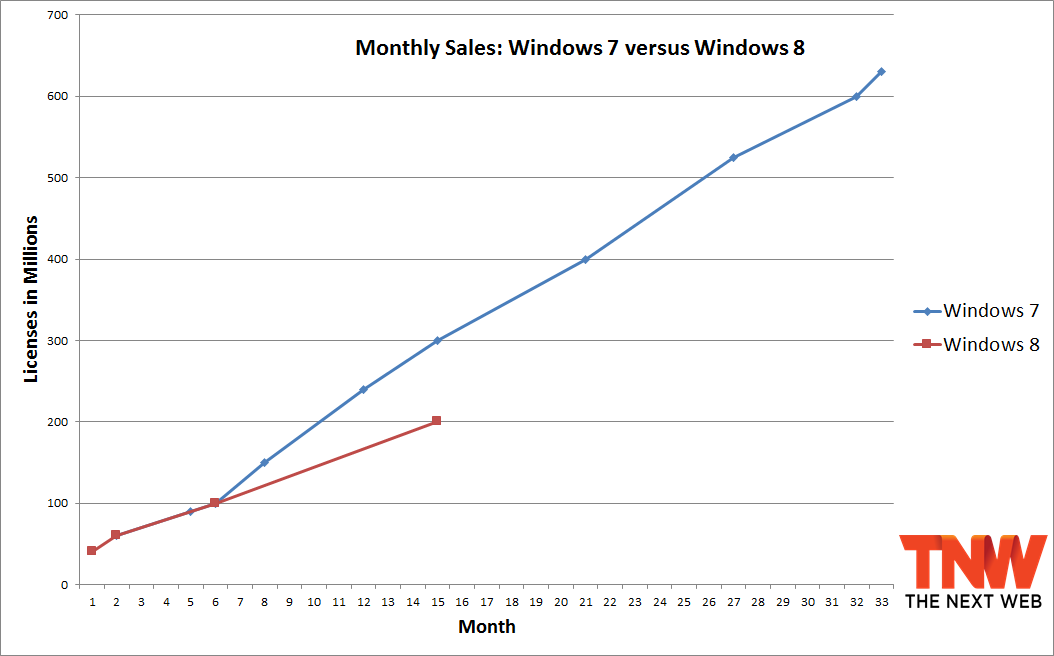
After 15 months, Windows 8 has sold 100 million fewer copies than Windows 7 did


While consumers are certainly still buying Windows 8, the latest and greatest operating system from Microsoft is not getting the same amount of love as Windows 7 did. That seems to be the general consensus, but now there’s data straight from the horse’s mouth to back that claim: at 15 months, Windows 8 sold 100 million fewer licenses than Windows 7 did, according to Microsoft’s own sales figures.
Microsoft today revealed that Windows 8 has passed the 200 million mark. The two operating systems grew at the same rate for their respective first six months, but then at some point things slowed down for Windows 7′s successor:
windows 7 windows 8 15 months After 15 months, Windows 8 has sold 100 million fewer copies than Windows 7 did
We can’t say when exactly the slowdown occurred because Microsoft didn’t share any new Windows 8 sales numbers between 100 million (six months) and 200 million (15 months). We can, however, point out that 2013 saw the worst yearly decline in PC shipments ever, so it shouldn’t be too surprising that Microsoft wasn’t eager to update anyone at 12 months. What we do know is broken down below.
Windows 7 launched on October 22, 2009. In October 2010, Microsoft revealed that it had sold over 240 million Windows 7 licenses in the operating system’s first year, and in January 2011 that number grew to 300 million at the 15-month mark.
Windows 8 launched on October 26, 2012. In February 2014, Microsoft revealed that it had sold over 200 million Windows 8 licenses in the operating system’s 15 months. No matter how you slice it, that’s not good news for the company.
What’s next? Microsoft is going to continue pushing updates for Windows 8 in the coming months (Windows 8.1 is already out and Windows 8.1 Update 1 is on its way), up until it’s ready to release Windows 9. The company is expected to talk about both at its Build conference between April 2 and 4 in San Francisco.

copied from: http://thenextweb.com/microsoft/2014/02/13/15-months-windows-8-sold-100-million-fewer-copies-windows-7/#!wXyT1

Sunday, February 12, 2012

Windows 8 bakal saingi iPad?

A Windows 8 Metro screen showing Microsoft Office 15 applications. Having a full version of Office on a tablet may be Microsoft's trump card.

Saingan utama iPad buat masa ini adalah peranti berdasarkan perisian sistem Android, yang mencatat jualan tertinggi melalui Amazon (Malah jika anda meninjau laman jual beli tempatan, lelong.com.my, hal yang sedemikian juga berlaku).

Akan tetapi, keupayaan Android jauh berbeza dari iPad. Seseorang yang membeli peranti berdasarkan sistem ini tidak boleh mengharapkan sesuatu yang hebat setanding iPad. Pengguna yang membeli sistem berasaskan Android buat masa ini harus menerima hakikat bahawa mesin komputernya akan melayari laman web secara lembab, tersekat-sekat atau tergantung.

Windows 8 dikhabarkan akan mensasarkan tumpuan ke arah penggunaan tablet pc. Berdasarkan rekod silam Microsoft yang berjaya menyediakan perisian ramah pengguna, kehadiran Windows 8 sudah pasti ditunggu-tunggu oleh pengguna yang mahu menggunakan tablet pc berdasarkan sistem ini. Bayangkan jika pengeluar PC tegar seperti Hewlett Packard memasarkan tablet PC berasaskan Windows 8 yang dilengkapi dengan perisian Microsoft Office, sudah tentu pengguna sedia ada PC tidak mahu beralih angin kepada iPad lagi.


---

A Windows 8 tablet offers hope as potent iPad foe


With Windows 8 now on a clearer path to release, expect the big device makers to try to crash the raucous Apple party with Microsoft leading the way.
Whither Android? So far, the only Android tablet supplier to come close to busting up the nonstop iPad festivities is Amazon.
That's high irony. Amazon is hardly a hardware company. And certainly a far cry from the likes of Motorola, Dell, Sony, Toshiba, Samsung, and Asus. All of which have failed to come up with a blockbuster Android alternative to the iPad. (Samsung and Asus have had limited success, but nothing that rivals the iPad in numbers.)
Here's what Deutsche Bank's Chris Whitmore said this week in a research note below a heading entitled "No iPad-killer in this bunch."
Analyst unsure about Android: "In the past 12 months, the tablet market has been flooded with a slew of Android-based devices; none of which have matched the success of the iPad. From a hardware perspective, it is clear most offerings are 'me-too' with little to no differentiation."
Whitmore continues. "We continue to believe these Android-based 'iPad-killers' will fall short. Many [device makers] seem to agree and are shifting their efforts on Win8 based tablets, which should ship in 2H12 (second half 2012)."
And this week that shift gained some velocity when Microsoft provided more clarity about Windows 8 on ARM in fairly exacting detail.
Waiting for a Windows 8 tablet: Personally, I'm anxious to get my hands on a Win 8 tablet from, say, Hewlett-Packard, Dell, Sony, or Samsung. Why? My experience (going on two months now) with the Motorola-Verizon XyBoard 10.1 (aka, Xoom 2) running Android 3.2 has been less than satisfying (though I do love Motorola's thin, lightweight design). In short, Android on my XyBoard doesn't have the reliability of iOS on my iPad 2.
Related stories
How the two flavors of Windows 8 will be different
TI offers rare demo of Windows 8 Explorer on newest ARM chip
The default Android browser often fails at doing really basic things like rendering Web pages quickly and opening mobile Web pages on some sites (forcing the browser to default to "desktop" seems to help). Other browsers like Opera Mobile are fast but have other shortcomings. Seem trivial? When you use the Web a lot like I do it's not (and I could go on, but that's for another post on another day).
Maybe I'm whining but here's the rub: I don't have these problems on the iPad. And I get the uneasy feeling that Motorola and/or Verizon don't have the laserlike focus that Apple has on product support. And Google's highly fragmented approach to upgrading Android (who knows when my XyBoard will get Android 4.0?) only makes things worse.
Maybe Microsoft brand + smooth user experience can offer a good iPad alternative: And this is where Microsoft has a shot at making things better. If Hewlett-Packard, for instance, can deliver a smooth (the catchall word to describe what Apple provides and Android lacks) experience on a Windows 8 tablet, plus access to a full version of Microsoft Office and Windows' file system to boot, that would be enough to give consumers pause when considering an iPad.
And Microsoft can use its most lethal weapon (Office) to turn the tablet into more of a creation/productivity device. The iPad (or any tablet for that matter) is still largely a passive experience.
Discipline is needed too. Microsoft has plenty of experience with making sure the user experience is relatively stable across different brands. In fact, some heavy-handed, authoritarian oversight never hurts when it comes to making sure the experience is smooth (Apple comes to mind).
Who knows, Microsoft may even steer buyers away from a next-generation 9-inch Kindle Fire while pulling consumers out of the long iPad lines.
If the price is right, that is. Needless to say, if Windows 8 tablets are not price competitive with the iPad, all bets are off.


Tuesday, April 21, 2009

Maklumat rahsia Windows 7 terbocor?


Maklumat yang cuba disembunyikan oleh Microsoft terlepas ke pengetahuan umum apabila hal ini secara tidak sengaja dipaparkan dalam salah satu website sekutu mereka.


Windows 7 Release Candidate coming 5 May

Microsoft spins out another 'leak'

Redmond suffered yet another butter fingers incident over the weekend when the company let slip that the near-ready version of Windows 7 will be made available on 5 May.
The company's partner program website revealed the date for the release candidate of its forthcoming operating system on Saturday.
Neowin picked up on the apparent gaffe and has a screen grab of the website here. Microsoft has since amended it, by removing the date from its site.
It had been carrying the message that paying subscribers to MDSN and TechNet could get their hands on the RC ahead of the 5 May release, when partners will be able to download it too.
"Partners: If you have a subscription to MSDN or TechNet, you can download Windows 7 RC now." said the website on Saturday. "Otherwise, you can download Windows 7 RC starting May 5, 2009."
This is the second time inside a month that one of Microsoft's websites has leaked details about Windows 7 RC.
Last month the firm 'mistakenly' revealed the RC was coming in May, would be available until June this year, that there's no limit on product key and it's set to expire in June 2010.
It also detailed hardware spec requirements for the operating system, including a PC running a minimum 1 GHz 32-bit or 64-bit processor or higher, 1GB of system memory and support for DirectX 9 graphics with 128MB memory. ®

Apple releases 4 new 'Get a Mac' ads

Apple menerbitkan empat iklan terbaru memperkecilkan PC yang menggunakan sistem pengendalian Microsoft Windows; mudah dijangkiti virus, tidak stabil dan sukar untuk digunakan.


April 20, 2009 12:21 PM PDT

Apple releases 4 new 'Get a Mac' ads

John Hodgman (left and center) and Justin Long reprise their roles as PC Guy and Mac Guy in four new Apple ads.

(Credit: Screenshot by Tom Krazit/CNET)

Apple released four new Get a Mac ads Monday, continuing its nearly 3-year-old campaign tweaking Windows PCs weeks after Microsoft began firing back at Apple.

The new ads are available on Apple's Web site, and will no doubt flood the airwaves in due course. Apple is following its old playbook with the new spots, tweaking PC guy as played by John Hodgman as virus-prone (Conficker), unstable, and difficult to use.

Microsoft's recent ads have focused on price comparisons with Macs, and Apple makes a brief reference to that line of thinking in the "Stacks" ad, in which Mac guy (Justin Long) responds to PC guy's observation that the facial-recognition technology in the new iPhoto must be expensive by noting that it comes free with every new Mac.

But otherwise it's the same old strategy of pushing the Mac as an easier-to-use and more reliable computer, withfew references to price. One new twist is that a controversy has already sprung up over some of the claims in the "Legal Copy" ad.

MacJournals actually took the time to transcribe all the fine print that's overlaid on that ad, which PC Guy says is necessary for him to make claims such as "PCs are now 100 percent trouble-free." Apple inserts a few slams at difficult-to-understand Windows components such as registry keys and virus-protection procedures, but also implies that some basic maintenance tips that apply to any computer, such as emptying the trash and downloading driver updates, are unique to the PC.

It's unlikely anyone watching the ad will actually be able to read the entire fine print as the ad whizzes by, but Apple has to be careful about how it advertises the Mac as "trouble-free," since when problems or confusion do occur with Mac OS X, customers can get disproportionately annoyed.

Still, the campaign's message seems to have had an impact over the past three years. While there's definitely something to be said for the "ain't broke, don't fix it" strategy, at some point Apple will need fresh ideas if Microsoft continues to hammer away with its own anti-Mac campaign.

Computer Spies Breach Fighter-Jet Project

Pengintip komputer berjaya menggodam sistem maklumat pertahanan Amerika Syarikat dan mencuri maklumat projek jet pejuang terbaru. Sumber mendakwa penggodam ini berpengkalan di China.


WASHINGTON -- Computer spies have broken into the Pentagon's $300 billion Joint Strike Fighter project -- the Defense Department's costliest weapons program ever -- according to current and former government officials familiar with the attacks.

Similar incidents have also breached the Air Force's air-traffic-control system in recent months, these people say. In the case of the fighter-jet program, the intruders were able to copy and siphon off several terabytes of data related to design and electronics systems, officials say, potentially making it easier to defend against the craft.

The latest intrusions provide new evidence that a battle is heating up between the U.S. and potential adversaries over the data networks that tie the world together. The revelations follow a recent Wall Street Journal report that computers used to control the U.S. electrical-distribution system, as well as other infrastructure, have also been infiltrated by spies abroad.

US Air Force

HACKING VICTIM: Spies are said to have stolen data on the F-35 Lightning II fighter. Here, the plane undergoes flight testing over Texas.

Attacks like these -- or U.S. awareness of them -- appear to have escalated in the past six months, said one former official briefed on the matter. "There's never been anything like it," this person said, adding that other military and civilian agencies as well as private companies are affected. "It's everything that keeps this country going."

Many details couldn't be learned, including the specific identity of the attackers, and the scope of the damage to the U.S. defense program, either in financial or security terms. In addition, while the spies were able to download sizable amounts of data related to the jet-fighter, they weren't able to access the most sensitive material, which is stored on computers not connected to the Internet.

Former U.S. officials say the attacks appear to have originated in China. However it can be extremely difficult to determine the true origin because it is easy to mask identities online.

Monday, April 20, 2009

Laptop bunuh tuannya

Sebuah laptop yang diletakkan di kerusi belakang sebuah kereta telah melayang ke hadapan dan mengenai kepala tuannya yang sedang memandu kereta tersebut. Akibatnya pemandu kereta itu meninggal dunia.

----

Police Conclude Airborne Laptop Computer Killed Woman

April 20, 2009 
By Jennifer Anderson 


A laptop computer killed its owner in March, according to a Royal Canadian Mounted Police spokesman on April 16. Heather Storey’s laptop was sitting unsecured in the back seat, and the vehicle’s abrupt stop sent the computer flying into the back of her head. Commenting on the accident, ergonomist Peter Budnick, Ph.D.,CPE, the Principal of Ergoweb, Inc., said the accident lends itself to a discussion about the proper storage and transport of notebooks  for mobile workers who have to lug them back and forth for work.

Storey, of Surrey, B.C., was driving to work when her vehicle was hit by a tow truck. The force of the blow was so severe that it shattered the computer's screen and bent the frame. The coroner determined in April that she died as a result of blunt force trauma.

This appears to be the only flying laptop fatality, yet the risk of death and injury is significant. Dr. Budnick recommends “a good carry case or roller case that can also hold an external keyboard, mouse, and notebook stand” for a laptop, and ergonomics and safety are served when the restraint issue is considered as carefully as the design of the bag. 

While laptop owners in transit by car usually place their machine in a case of the kind recommended by Dr. Budnick, that bag is usually unsecured on the floor or on a seat when the vehicle is moving.

Airlines provide overhead lockers for safely stowing items that could become deadly missiles during sudden turbulence, but few laptop-using passengers choose to use them when they plan to work on their machine during the flight. They work with the unsecured machine perched on the food tray or on their lap. The Surrey fatality could prompt a second look at this common practice. 

It could also give the laptop accessory market a boost. Some manufacturers have anticipated the potential for flying computers. There are various models of automobile “desks,” securely-mounted platforms that hold the computer securely. Some designs fit in the passenger seat, held safely in place with the seat belt when the vehicle is moving. 

Source: Canadian Press; Dr. Peter Budnick