Auto-generate Flow Chart from Java/C++ Codes:
Raptor Flowchart Tutorial For Beginners
Showing posts with label Simple Way To.... Show all posts
Saturday, January 05, 2013
Simple Way To Develop Mobile Game Using HTML5
Cara Mudah Bangunkan Permainan Mobile Menggunakan HTML5
http://mobile.smashingmagazine.com/2012/10/19/design-your-own-mobile-game/
Thursday, December 13, 2012
Simple Way To Learn JavaScript
Cara Mudah Belajar JavaScript
Terkini: Saya telah menulis semula tutorial dalam bahasa Melayu Cara Mudah Belajar JavaScript.
JavaScript is a prototype-based scripting language that is dynamic, weakly typed and has first-class functions. It uses syntax influenced by the language C. JavaScript copies many names and naming conventions from Java, but the two languages are otherwise unrelated and have very different semantics.
JavaScript's use in applications outside web pages — for example in PDF documents, site-specific browsers, and desktop widgets—is also significant. Newer and faster JavaScript VMs and frameworks built upon them (notably Node.js) have also increased the popularity of JavaScript for server-side web applications.
pseudo-code
output
1.1.2.Selection (pilihan)
pseudo-code
output IF
output ELSE
1.1.3.Loop (gelung)
pseudo-code
output
1.3.1.Basic Code Structure
1.3.2.Reserved Keywords
1.3.3.Data Containers
1.3.4.Data Operators
pseudo-code
output
explanation
Read Full Content
Terkini: Saya telah menulis semula tutorial dalam bahasa Melayu Cara Mudah Belajar JavaScript.
Notes On Introduction To JavaScript
by www.NotaRazi.com
Introduction
JavaScript (sometimes abbreviated JS) is a scripting language commonly implemented as part of a web browser in order to create enhanced user interfaces and dynamic websites.JavaScript is a prototype-based scripting language that is dynamic, weakly typed and has first-class functions. It uses syntax influenced by the language C. JavaScript copies many names and naming conventions from Java, but the two languages are otherwise unrelated and have very different semantics.
JavaScript's use in applications outside web pages — for example in PDF documents, site-specific browsers, and desktop widgets—is also significant. Newer and faster JavaScript VMs and frameworks built upon them (notably Node.js) have also increased the popularity of JavaScript for server-side web applications.
1.Generic Approach To Learn Programming
1.1.Control Flow Structure
1.1.1.Sequential (turutan)pseudo-code
| BEGIN PRINT “Hello World” END |
output
| Hello World |
1.1.2.Selection (pilihan)
pseudo-code
| BEGIN READ pin IF pin=1234 PRINT “correct” ELSE PRINT “wrong” ENDIF END |
output IF
| 1234 “correct” |
output ELSE
| 5678 “wrong” |
1.1.3.Loop (gelung)
pseudo-code
| BEGIN FOR a: 1 TO 10 PRINT a + “**********” ENDFOR END |
output
| 1********** 2********** 3********** 4********** 5********** 6********** 7********** 8********** 9********** 10********** |
1.2. Basic Code Module Structure
pseudo-code| MAIN MODULE BEGIN Action1 Action2 Call Module1 Action3 END MAIN MODULE |
| MODULE1 BEGIN Action1 Action2 Return Value END MODULE 1 |
1.3. Code Syntax
1.3.1.Basic Code Structure
1.3.2.Reserved Keywords
1.3.3.Data Containers
1.3.4.Data Operators
pseudo-code
| READ Y,Z //y=2, z=3 LET X= 3 * Y - (2+Z) PRINT X |
output
| 1 |
explanation
| RESERVED KEYWORDS DATA CONTAINERS DATA OPERATORS DATA |
Read Full Content
Tuesday, December 04, 2012
Simple Way to create watermark on image files
Cara Mudah membuat watermark di atas file imej
Water mark adalah tanda unik yang diletakkan di atas imej oleh pemilik imej berkenaan agar hakmiliknya dapat dikenalpasti. Tanda ini sangat penting terutamanya apabila fail-fail imej yang berada di dalam persekitaran Internet mudah disalin dari satu website ke website yang lain.
Terdapat website yang menawarkan khidmat Water Mark seperti http://www.watermark.ws/ . Walaubagaimanapun, khidmat percuma ini dihadkan kepada fail imej yang bersaiz kecil.

Terdapat juga perisian Water Mark untuk Desktop seperti di http://www.watermark-software.com/ . Pengguna perlu download program tersebut terlebih dahulu sebelum boleh menggunakannya. Anda boleh mencuba perisian demo di sini http://www.mediafire.com/download.php?zy0vq1exbkb3x6i.

Perisian-perisian yang disebutkan di atas mempunyai Antaramuka Pengguna (User Interface) yang mudah difahami dan dioperasikan oleh pengguna.
Labels:
Cara Mudah Untuk...,
program,
Simple Way To...,
watermark
Saturday, December 01, 2012
Simple Way To Learn Object Oriented Database System Development
Cara Mudah Belajar Pembangunan Sistem Object Oriented Database
Cara Mudah Belajar Pembangunan Sistem Pangkalan Data Berorientasikan Objek
1) Pengenalan
Introduction to ODBMS
By Rick Grehan
An object database management system (ODBMS, also referred to as object-oriented database management system or OODBMS), is a database management system (DBMS) that supports the modelling and creation of data as objects. This includes some kind of support for classes of objects and the inheritance of class properties and methods by subclasses and their objects. (Baca selanjutnya)
2) Perisian Rekabentuk JDeveloper
Database Shema Modeling in JDeveloper
This tutorial shows you how to create a database diagram with database components. You'll see how to create a database user, reconcile the offline definitions with the current database definitions, and generate a DDL reconciliation script. Finally you reverse-engineer database objects.
To see the complete application you will create, click the Download button to download a zip of the final application. Unzip it into your JDeveloper folder. (Baca selanjutnya)
Cara Mudah Belajar Pembangunan Sistem Pangkalan Data Berorientasikan Objek
1) Pengenalan
Introduction to ODBMS
By Rick Grehan
An object database management system (ODBMS, also referred to as object-oriented database management system or OODBMS), is a database management system (DBMS) that supports the modelling and creation of data as objects. This includes some kind of support for classes of objects and the inheritance of class properties and methods by subclasses and their objects. (Baca selanjutnya)
2) Perisian Rekabentuk JDeveloper
Database Shema Modeling in JDeveloper
This tutorial shows you how to create a database diagram with database components. You'll see how to create a database user, reconcile the offline definitions with the current database definitions, and generate a DDL reconciliation script. Finally you reverse-engineer database objects.
To see the complete application you will create, click the Download button to download a zip of the final application. Unzip it into your JDeveloper folder. (Baca selanjutnya)
Labels:
Cara Mudah Untuk...,
database,
Java,
oracle,
Simple Way To...
Tuesday, November 27, 2012
Simple Way To Practice SQL Online
Cara Mudah Untuk Belajar Praktis SQL Secara Online
1) http://sqlfiddle.com
2) http://sqlzoo.net
3) http://apex.oracle.com (Oracle)
Labels:
Cara Mudah Untuk...,
database,
mysql,
oracle,
Simple Way To...
Monday, November 26, 2012
Simple Way To Learn Linux Commands Using Online Terminal
Cara Mudah Belajar Linux Commands Melalui Online Terminal
Cara Mudah Belajar Arahan Linux Melalui Terminal Atas Talian
Jika anda hanya sekadar mahu mencuba-cuba sebahagian kecil arahan UNIX/LINUX, anda tidak perlu memasang LINUX pada komputer anda, anda boleh menggunakan terminal di pautan berikut, http://www.masswerk.at/jsuix/.
Apabila anda klik pautan di atas, anda akan melihat paparan di bawah. Klik pada teks >Open Terminal untuk memulakan sessi terminal.
Anda boleh rujuk koleksi arahan UNIX/LINUX di pautan berikut: http://cb.vu/unixtoolbox.xhtml (Tidak semua arahan ini boleh dilaksanakan melalui terminal di atas)
Simple Way To Reset Oracle Database SYSTEM Password
Cara Mudah Untuk Reset Oracle Database SYSTEM Password
Sudah menjadi kelaziman, para administrator kadang-kadang terlupa password yang dibuat untuk SYSTEM (SYS dan SYSDBA) bagi Oracle Database.
Blog berikut memberikan panduan menghadapinya bagi:
1) Sistem Linux
2) Sistem Windows
=======================================================
SISTEM LINUX
sumber: http://rolfje.wordpress.com/2007/01/16/lost-oracle-sys-and-system-password/
Lost Oracle SYS and SYSTEM password?
If your administration is as good as anybodies, you are bound to loose the not-so-frequently used password for the SYS and SYSTEM users of oracle. Here are a few ways I found to re-set those passwords:
Method 1: SQLPLUS (Tested on AIX Oracle 9.2.0.1.0)
Log into the database server as a user belonging to ‘dba’ [unix ] or ‘ora_dba’ [windows ] group , typically ‘oracle’, or an administrator on your windos machine. You are able to log into Oracle as SYS user, and change the SYSTEM password by doing the following:
Method 2: Creating pwd file (Tested on Windows Oracle 8.1.7)
Method 1: SQLPLUS (Tested on AIX Oracle 9.2.0.1.0)
Log into the database server as a user belonging to ‘dba’ [unix ] or ‘ora_dba’ [windows ] group , typically ‘oracle’, or an administrator on your windos machine. You are able to log into Oracle as SYS user, and change the SYSTEM password by doing the following:
$ sqlplus "/ as sysdba" SQL*Plus: Release 9.2.0.1.0 - Production on Mon Apr 5 15:32:09 2004 Copyright (c) 1982, 2002, Oracle Corporation. All rights reserved. Connected to: Oracle9i Enterprise Edition Release 9.2.0.1.0 - Production With the OLAP and Oracle Data Mining options JServer Release 9.2.0.1.0 - Production SQL> show user USER is "SYS" SQL> passw system Changing password for system New password: Retype new password: Password changed SQL> quitNext, we need to change the password of SYS:
$ sqlplus "/ as system" SQL*Plus: Release 9.2.0.1.0 - Production on Mon Apr 5 15:36:45 2004 Copyright (c) 1982, 2002, Oracle Corporation. All rights reserved. SP2-0306: Invalid option. Usage: CONN[ECT] [logon] [AS {SYSDBA|SYSOPER}] whereYou should now be able to log on the SYS and SYSTEM users, with the passwords you just typed in.::= Connected to: Oracle9i Enterprise Edition Release 9.2.0.1.0 - Production With the OLAP and Oracle Data Mining options JServer Release 9.2.0.1.0 - Production SQL> passw sys Changing password for sys New password: Retype new password: Password changed SQL> quit[/ ][@ ] | / Enter user-name: system Enter password:
Method 2: Creating pwd file (Tested on Windows Oracle 8.1.7)
- Stop the Oracle service of the instance you want to change the passwords of.
- Find the PWD###.ora file for this instance, this is usuallly located atC:\oracle\ora81\database\, where ### is the SID of your database.
- rename the PWD###.ora file to PWD###.ora.bak for obvious safety reasons.
- Create a new pwd file by issuing the command:
orapwd file=C:\oracle\ora81\database\PWD###.ora password=XXXXX
where ### is the SID and XXXXX is the password you would like to use for the SYS and INTERNAL accounts. - Start the Oracle service for the instance you just fixed. You should be able to get in with the SYS user and change other passwords from there.
=======================================================
SISTEM WINDOWS
sumber: http://www.componentworkshop.com/blog/2009/05/07/oracle-reset-forgottenunknown-system-password
If you have forgotten the SYSTEM password for an Oracle Database Server, you can reset it by logging in to Windows as Administrator and connecting to Oracle as sysdba. This tip explains how.
Great Book
For this to work you must be logged in to the Windows Server that is running Oracle as Administrator. Here are the steps to reset the password:
Start SQL*Plus (Start -> Programs -> Oracle – Instance Name -> Application Development -> SQL Plus).
At the login prompt, in the user-name field, type ”/as sysdba” (including the forward slash, but without the quotes). Click OK.
You are now connected as system with full DBA rights.
To reset the password of the SYSTEM password (or any other user password), run the following query:
alter user system identified by NewPasswordHere;
Change the password to whatever you want it to be. Note also that it doesn't need to be in single quotes, as you might expect. Hit ENTER to run the query and you should receive positive affirmation of the change:
“User altered.”
If you don't have SQL*Plus (for example, if you are using Oracle XE), open a console (Start -> Run -> type 'cmd.exe' followed by and then run sqlplus from the command line:
sqlplus / as sysdba
Once connected, use alter user as described above.
Apart from the more obvious uses, this tip is particularly useful if you’ve imported a database dump from another server and don’t know the system password.
Friday, November 02, 2012
Simple Way To... Get Rid of TR/ATRAPS.Gen2 Completely – Remove TR/ATRAPS.Gen2 Manually
Cara Mudah Untuk... Nyahkan virus TR/ATRAPS.Gen2
Selepas terkena Smart HDD Virus, laptop saya terkena jangkitan TR/ATRAPS.Gen2 pula.
Saya terjumpa artikel di bawah. Tapi saya belum ikut lagi langkah2nya kerana saya mahu mencuba dengan SuperAntiSpyWare terlebih dahulu.
Setelah SuperAntiSpyWare menjalankan kerja-kerja nyah-virus dan laptop dihidupkan semula, Avira tetap mengeluarkan mesej tanda virus gagal dinyahkan seperti berikut:
Maknanya SuperAntiSpyWare pun tak mampu nak menentang TR/ATRAPS.Gen2
Seterusnya, saya cuba combofix pula (http://www.combofix.org/)
Lama juga Combofix bekerja. Laptop reboot dan Combofix terus bekerja dan memaparkan mesej melalui Tetingkap Konsol (Console Window). Akhirnya laptop reboot lagi sekali. Saya menunggu kalau-kalau Avira mengeluarkan mesej virus dikesan seperti di atas. Buat masa ini belum keluar.
Maka rumusannya, COMBOFIX adalah cara mudah untuk menyahkan TR/ATRAPS.Gen2!!
-------------------------------------------------------------------
Selepas terkena Smart HDD Virus, laptop saya terkena jangkitan TR/ATRAPS.Gen2 pula.
Saya terjumpa artikel di bawah. Tapi saya belum ikut lagi langkah2nya kerana saya mahu mencuba dengan SuperAntiSpyWare terlebih dahulu.
Setelah SuperAntiSpyWare menjalankan kerja-kerja nyah-virus dan laptop dihidupkan semula, Avira tetap mengeluarkan mesej tanda virus gagal dinyahkan seperti berikut:
Maknanya SuperAntiSpyWare pun tak mampu nak menentang TR/ATRAPS.Gen2
Seterusnya, saya cuba combofix pula (http://www.combofix.org/)
Lama juga Combofix bekerja. Laptop reboot dan Combofix terus bekerja dan memaparkan mesej melalui Tetingkap Konsol (Console Window). Akhirnya laptop reboot lagi sekali. Saya menunggu kalau-kalau Avira mengeluarkan mesej virus dikesan seperti di atas. Buat masa ini belum keluar.
Maka rumusannya, COMBOFIX adalah cara mudah untuk menyahkan TR/ATRAPS.Gen2!!
-------------------------------------------------------------------
How to Get Rid of TR/ATRAPS.Gen2 Completely – Remove TR/ATRAPS.Gen2 Manually
Avira keeps reporting TR/ATRAPS.Gen2 inside your computer? This virus always comes bundled with TR/Sirefef.AG.35 virus. Both of these Trojans are able to allow a remote attacker to gain control on the compromised computer. Remove it as quickly as you can once upon detection.
Once inside, it can deliver other malicious programs onto the infected computer system. Besides, it allows attackers to gain remote access and control to a victim’s PC, enabling them to steal any sensitive information such as passwords, usernames and login details found. Thus, your computer will be at risk and damaged easily. While you are surfing the web, it displays annoying ads and from that time, computer is slower and slower. That includes starting up, shutting down, playing games, and surfing the web. Therefore, you must remove such dangerous Trojan as soon as possible once found on your computer.
It prevents you from opening some application because the files are corrupted.
It can make your browser redirected to all kinds of malicious websites.
It is able to allow remote hacker access the compromised system for illicit purpose.
Note: TR/ATRAPS.Gen2 is a highly dangerous Trojan created by the internet hackers and infects your computer through vulnerability or security program exploits. Once found, an immediate removal is needed. You can chat with an expert now to further know about this virus.

From malicious drive-by-download scripts from corrupted porn and shareware / freeware websites.
Through spam email attachments, media downloads and social networks.
When clicking suspicious popups or malicious links.
Open unknown email or download media files that contain the activation code of the virus.
Note: No matter how does the virus access your PC, users should know that there are no tools can remove this virus automatically at this moment, it is suggested users not spend much time in downloading or paying any security software which claims can delete this stubborn virus. It is totally useless. To completely get rid of this pest, professional manual guide is needed.

2. Show hidden files and folders.

3. Open Registry entries. Find out the malicious files and entries and then delete all.
Attention: Always be sure to back up your PC before making any changes.
a. Press the “Start” button and then choose the option “Run”. In the “Open” field, type “regedit” and click the “OK” button.


b. All malicious files and registry entries that should be deleted:
%System%\drivers\[RANDOM CHARACTERS].sys
%Temp%\[random]
C:\WINDOWS\system32\[random name].dll
HKEY_CURRENT_USER\Software\Microsoft\Windows\CurrentVersion\Policies\Explorer “NoDesktop” = ’1?
HKEY_CURRENT_USER\Software\Microsoft\Windows\CurrentVersion\Policies\System “DisableTaskMgr” = ’1?
HKEY_CURRENT_USER\Software\Microsoft\Windows\CurrentVersion\Run “[random].exe”
HKEY_CURRENT_USER\Software\Microsoft\Windows\CurrentVersion\Run “[random]”
HKEY_LOCAL_MACHINE\SOFTWARE\Microsoft\Windows\CurrentVersion\policies\system “DisableTaskMgr” = ’1?
HKEY_CURRENT_USER\Software\Microsoft\Internet Explorer\Download “CheckExeSignatures” = ‘no’
Manual removal of TR/ATRAPS.Gen2 requires Expertise, Please take care before performing the steps.
TR/ATRAPS.Gen2 Description
TR/ATRAPS.Gen2 is classified as a nasty Trojan infection that can penetrate into the corrupted PC without the computer user’s consent and awareness. After accessing the target computer, it disguises itself in Windows directory folder named System32 or System64 based on the type of the OS so that it is difficult for user to detect or remove this pesky Trojan by the current security tools. Most of time, users can discover this trojan by running Avira Antivirus, however, it can’t help to delete TR/ATRAPS.Gen2 completely as the virus always comes back again and again after each time rebooting the machine. Without a doubt, this trojan is a disaster for all the computers.Once inside, it can deliver other malicious programs onto the infected computer system. Besides, it allows attackers to gain remote access and control to a victim’s PC, enabling them to steal any sensitive information such as passwords, usernames and login details found. Thus, your computer will be at risk and damaged easily. While you are surfing the web, it displays annoying ads and from that time, computer is slower and slower. That includes starting up, shutting down, playing games, and surfing the web. Therefore, you must remove such dangerous Trojan as soon as possible once found on your computer.
Trojan infected symptoms:
It can bypass the legit security tools and destroy your computer secretly.It prevents you from opening some application because the files are corrupted.
It can make your browser redirected to all kinds of malicious websites.
It is able to allow remote hacker access the compromised system for illicit purpose.
Note: TR/ATRAPS.Gen2 is a highly dangerous Trojan created by the internet hackers and infects your computer through vulnerability or security program exploits. Once found, an immediate removal is needed. You can chat with an expert now to further know about this virus.

Cause:
TR/ATRAPS.Gen2 can infect via many ways:From malicious drive-by-download scripts from corrupted porn and shareware / freeware websites.
Through spam email attachments, media downloads and social networks.
When clicking suspicious popups or malicious links.
Open unknown email or download media files that contain the activation code of the virus.
Note: No matter how does the virus access your PC, users should know that there are no tools can remove this virus automatically at this moment, it is suggested users not spend much time in downloading or paying any security software which claims can delete this stubborn virus. It is totally useless. To completely get rid of this pest, professional manual guide is needed.
Manual Removal Guides:
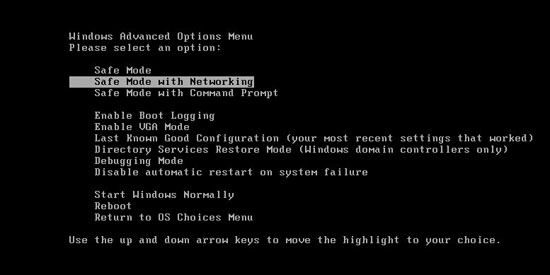
1. Reboot your computer to safe mode with networking. As your computer restarts but before Windows launches, tap “F8″ key constantly.
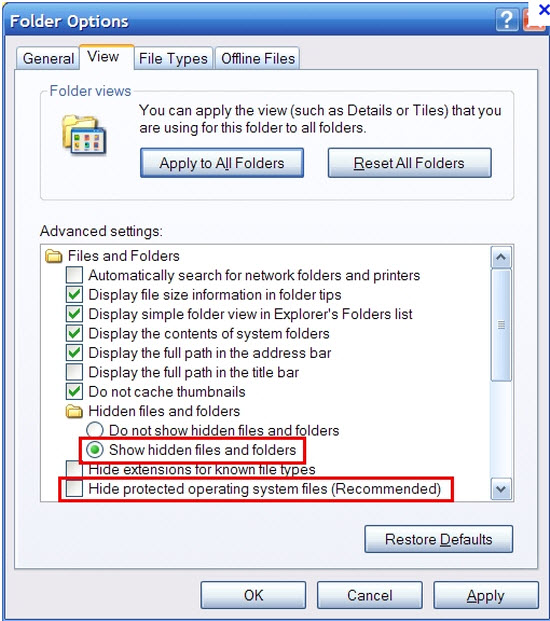
2. Show hidden files and folders.
Open Folder Options by clicking the Start button, clicking Control Panel, clicking Appearance and Personalization, and then clicking Folder Options.
Click the View tab.
Under Advanced settings, click Show hidden files and folders, uncheck Hide protected operating system files (Recommended) and then click OK.
Click the View tab.
Under Advanced settings, click Show hidden files and folders, uncheck Hide protected operating system files (Recommended) and then click OK.

3. Open Registry entries. Find out the malicious files and entries and then delete all.
Attention: Always be sure to back up your PC before making any changes.
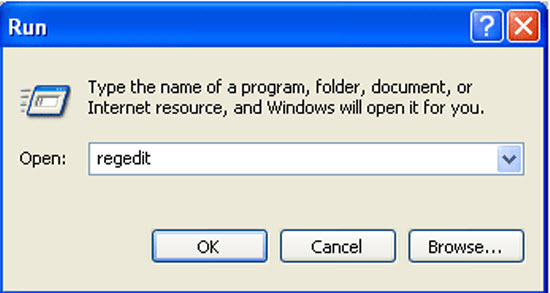
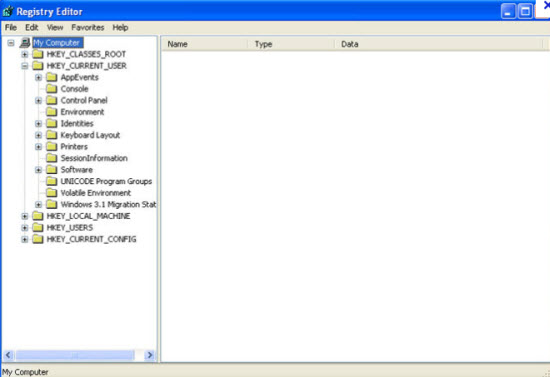
a. Press the “Start” button and then choose the option “Run”. In the “Open” field, type “regedit” and click the “OK” button.


b. All malicious files and registry entries that should be deleted:
%System%\drivers\[RANDOM CHARACTERS].sys
%Temp%\[random]
C:\WINDOWS\system32\[random name].dll
HKEY_CURRENT_USER\Software\Microsoft\Windows\CurrentVersion\Policies\Explorer “NoDesktop” = ’1?
HKEY_CURRENT_USER\Software\Microsoft\Windows\CurrentVersion\Policies\System “DisableTaskMgr” = ’1?
HKEY_CURRENT_USER\Software\Microsoft\Windows\CurrentVersion\Run “[random].exe”
HKEY_CURRENT_USER\Software\Microsoft\Windows\CurrentVersion\Run “[random]”
HKEY_LOCAL_MACHINE\SOFTWARE\Microsoft\Windows\CurrentVersion\policies\system “DisableTaskMgr” = ’1?
HKEY_CURRENT_USER\Software\Microsoft\Internet Explorer\Download “CheckExeSignatures” = ‘no’
Video Shows You How to Safely Modify Windows Registry Editor:
Manual removal of TR/ATRAPS.Gen2 requires Expertise, Please take care before performing the steps.
Monday, October 29, 2012
Simple Way To... Uninstall Smart HDD Virus/Malware
Cara Mudah Untuk... Membuang Virus/Malware Smart HDD
Semasa memuatturun dokumen dari multiply akibat penutupan servisnya, laptop saya tiba-tiba berkelakuan ganjil. Muncul Tingkap Dialog Amaran mengatakan ada masalah dengan Hard Disk. Cuak juga rasanya. Laptop ini baru lima bulan dibeli. Takkanlah kualiti perkakasannya seteruk ini. Kemudiannya, Pak Cik Google memberithu ia adalah Smart HDD. Lega, at least I know that laptop is physically OK.
Virus ini menukarkan atribut bagi setiap fail direktori kepada hidden hingga akhirnya saya tak dapat lagi melihat nama-namanya di dalam Tingkap Windows Explorer. Lebih buruk lagi ia memadam kandungan Start Button. Lalu kosong dan tak dapat hendak mencapai apa-apa perisian ataupun fail.
Saya tahu fail/direktori sebenarnya tidak hilang tetapi cuma tersorok sahaja. Maka saya gunakan Perisian Portable 7Zip untuk meninjau fail/direktori ini (Saya hidupkan Windows melalui Safe Mode). Melalui tinjaun ini, semuanya didapati masih wujud. Dengan menggunakan 7Zip saya tukarkan buang atribut hidden. Tapi simptom tidak akan selesai hinggalah Smart HDD dibuang sepenuhnya.
Saya dapati http://malwaretips.com/blogs/smart-hdd-removal-steps/ menyediakan panduan yang agak menyeluruh juga. Walaubagaimanapun, saya malas nak spend masa buat kerja-kerja ini. Saya pindahkan semua fail/direktori penting keluar, dan saya gunakan Recovery Software laptop saya untuk kembalikan laptop ke status asal ketika keluar dari kilang (Ini lagi mudah, tinggalkan aje buat sejam dua dan pergi diner dulu, balik nanti laptop dah ready :-P).
----------
Semasa memuatturun dokumen dari multiply akibat penutupan servisnya, laptop saya tiba-tiba berkelakuan ganjil. Muncul Tingkap Dialog Amaran mengatakan ada masalah dengan Hard Disk. Cuak juga rasanya. Laptop ini baru lima bulan dibeli. Takkanlah kualiti perkakasannya seteruk ini. Kemudiannya, Pak Cik Google memberithu ia adalah Smart HDD. Lega, at least I know that laptop is physically OK.
Virus ini menukarkan atribut bagi setiap fail direktori kepada hidden hingga akhirnya saya tak dapat lagi melihat nama-namanya di dalam Tingkap Windows Explorer. Lebih buruk lagi ia memadam kandungan Start Button. Lalu kosong dan tak dapat hendak mencapai apa-apa perisian ataupun fail.
Saya tahu fail/direktori sebenarnya tidak hilang tetapi cuma tersorok sahaja. Maka saya gunakan Perisian Portable 7Zip untuk meninjau fail/direktori ini (Saya hidupkan Windows melalui Safe Mode). Melalui tinjaun ini, semuanya didapati masih wujud. Dengan menggunakan 7Zip saya tukarkan buang atribut hidden. Tapi simptom tidak akan selesai hinggalah Smart HDD dibuang sepenuhnya.
Saya dapati http://malwaretips.com/blogs/smart-hdd-removal-steps/ menyediakan panduan yang agak menyeluruh juga. Walaubagaimanapun, saya malas nak spend masa buat kerja-kerja ini. Saya pindahkan semua fail/direktori penting keluar, dan saya gunakan Recovery Software laptop saya untuk kembalikan laptop ke status asal ketika keluar dari kilang (Ini lagi mudah, tinggalkan aje buat sejam dua dan pergi diner dulu, balik nanti laptop dah ready :-P).
----------
Smart HDD Uninstall Instructions
Smart HDD is a malicious software that will display fake alerts, claiming that several hard drive errors were detected on your computer.The alerts are professional looking pop-ups and when you click on them, you’re advised to buy Smart HDD in order to fix this errors.
In reality, none of the reported issues are real, and are only used to scare you into buying Smart HDD and stealing your personal financial information.
If you’ve got a Smart HDD infection , you’ll be seeing this screens :
In reality, none of the reported issues are real, and are only used to scare you into buying Smart HDD and stealing your personal financial information.
If you’ve got a Smart HDD infection , you’ll be seeing this screens :
![Smart HDD [Image: Smart-HDD.png]](http://malwaretips.com/images/fakeav/Smart-HDD.png)
Smart HDD will generate the following error messages:
Hard drive boot sector reading error
During I/O system initialization, the boot device driver might have failed to initialize the boot device. File system initialization might have failed because it did not recognize the data on the boot device.
System blocks were not found
This has most likely occurred because of hard disk failure.
This may also lead to a potential loss of data.
Error 0×00000024 – NTFS_FILE_SYSTEM
The Stop 0×24 message indicates that a problems occurred within Ntfs.sys, the driver file that allows the system to read and write to NTFS file system drives. It is most often related to hard drive errors.
Error 0×00000078 – INACCESSIBLE_BOOT_DEVICE
The Stop 0×78 message indicates that Windows has lost access to the system partition or boot volume during the startup process. During I/O system initialization, the boot device driver might have failed to initialize the boot device (typically a hard disk). Repartitioning the system partition or installing a new SATA/RAID adapter or disk controller might also induce this error.
The DRM attribute value is too small before disk scan
Drive Reliability Monitor (a system or monitoring the reliability of disc drive functioning). The malfunction counter built into the disk drive shows excessive number of malfunctions. The storage device needs to be replaced.
Error 0×00000050 – PAGE_FAULT_IN_NONPAGED_AREA
The Stop 0×50 message indicates that requested data was not in memory. The system generates an exception error when using a reference to an invalid system memory address.
Error 0x0000002E – DATA_BUS_ERROR
The Stop 0x2E message is typically caused by failed or defective RAM (including motherboard, Level 2 cache, or video memory), incompatible or mismatched memory hardware, or when a device driver attempts to access an address in the 0x8xxxxxxx range that does not exist (does not map to a physical address).
Registration codes for Smart HDD
As an optional step,you can use the following license key to register Smart HDD and stop the fake alerts.
15801587234612645205224631045976
Please keep in mind that entering the above registration code will NOT remove Smart HDD from your computer , instead it will just stop the fake alerts so that you’ll be able to complete our removal guide more easily.
We strongly advise you to follow our Smart HDD removal guide and ignore any alerts that this malicious software might generate.Under no circumstance should you buy this rogue security software as this could lead to identity theft.
15801587234612645205224631045976
Please keep in mind that entering the above registration code will NOT remove Smart HDD from your computer , instead it will just stop the fake alerts so that you’ll be able to complete our removal guide more easily.
We strongly advise you to follow our Smart HDD removal guide and ignore any alerts that this malicious software might generate.Under no circumstance should you buy this rogue security software as this could lead to identity theft.
Removal guide for Smart HDD
STEP 1 : Start your computer in Safe Mode with Networking
- Remove all floppy disks, CDs, and DVDs from your computer, and then restart your computer.
- Press and hold the F8 key as your computer restarts.Please keep in mind that you need to press the F8 key before the Windows start-up logo appears.
- On the Advanced Boot Options screen, use the arrow keys to highlight Safe Mode with Networking , and then press ENTER.
![Safe Mode with Networking screen [Image: Safemode.jpg]](http://malwaretips.com/images/removalguide/safemode.jpg)
- Log on to your computer with a user account that has administrator rights
STEP 2: Remove Smart HDD malicious proxy server
Smart HDD may add a proxy server which prevents the user from accessing the internet,follow the below instructions to remove the proxy.
- Start Internet Explorer
and if you are using Internet Explorer 9 ,click on the gear icon
(Tools for Internet Explorer 8 users) ,then select Internet Options.![Internet Options in IE [Image: Internet-options-IE.png]](http://malwaretips.com/images/removalguide/ie1.png)
- Go to the tab Connections.At the bottom, click on LAN settings.
![Connections tab in Internet Explorer [Image: Remove-proxy-server2.png]](http://malwaretips.com/images/removalguide/ie2.png)
- Uncheck the option Use a proxy server for your LAN. This should remove the malicious proxy server and allow you to use the internet again.
![Uncheck the option Use a proxy server for your LAN [Image: Remove-proxy-server3.png]](http://malwaretips.com/images/removalguide/ie3.png)
If you are a Firefox users, go to Firefox(upper left corner) → Options → Advanced tab → Network → Settings → Select No Proxy
STEP 3: Run RKill to terminate known malware processes associated with Smart HDD.
RKill is a program that attempts to terminate any malicious processes associated with Smart HDD ,so that your normal security software can then run and clean your computer of infections.
As RKill only terminates a program’s running process, and does not delete any files, after running it you should not reboot your computer as any malware processes that are configured to start automatically will just be started again.
- While your computer is in Safe Mode with Networking ,please download the latest official version of RKill.

- Double-click on the RKill iconin order to automatically attempt to stop any processes associated with Smart HDD.
![RKILL ICON [Image: run-rkill-1.png]](http://malwaretips.com/images/removalguide/rkill1.png)
- RKill will now start working in the background, please be patient while the program looks for various malware programs and tries to terminate them.
![RKILL Command prompt [Image: run-rkill-2.png]](http://malwaretips.com/images/removalguide/rkill2.png)
IF you receive a message that RKill is an infection, that is a fake warning given by the rogue. As a possible solution we advise you to leave the warning on the screen and then try to run RKill again.Run RKill until the fake program is not visible but not more than ten times.
IF you continue having problems running RKill, you can download the other renamed versions of RKill from here. - When Rkill has completed its task, it will generate a log. You can thenproceed with the rest of the guide.
![RKILL LOG [Image: Smart HDD rkill3.jpg]](http://malwaretips.com/images/removalguide/rkill3.png)
WARNING: Do not reboot your computer after running RKill as the malware process will start again , preventing you from properly performing the next step.
STEP 4: Remove Smart HDD malicious files withMalwarebytes Anti-Malware FREE
- Please download the latest official version of Malwarebytes Anti-Malware FREE.

- Install Malwarebytes’ Anti-Malware by double clicking on mbam-setup.
![Malwarebytes Anti-Malware Installer [Image: malwarebytes-installer.png]](http://malwaretips.com/images/removalguide/mbam1.png)
- When the installation begins, keep following the prompts in order to continue with the installation process. Do not make any changes to default settings and when the program has finished installing, make sure you leave both the Update Malwarebytes’ Anti-Malware and Launch Malwarebytes’ Anti-Malware checked. Then click on the Finishbutton. If Malwarebytes’ prompts you to reboot, please do not do so.
![Install Malwarebytes Anti-Malware [Image: install-malwarebytes.png]](http://malwaretips.com/images/removalguide/mbam2.png)
- Malwarebytes Anti-Malware will now start and you’ll be prompted to start a trial period , please select ‘Decline‘ as we just want to use the on-demand scanner.
- On the Scanner tab,please select Perform full scan and then click on theScan button to start scanning your computer for any possible infections.
![Perform a Full System Scan [Image: malwarebytes-full-system-scan.png]](http://malwaretips.com/images/removalguide/mbam4.png)
- Malwarebytes’ Anti-Malware will now start scanning your computer for Smart HDD malicious files as shown below.
![Malwarebytes Anti-Malware scanning for Smart HDD [Image: malwarebytes-scanning.png]](http://malwaretips.com/images/removalguide/mbam5.png)
- When the scan is finished a message box will appear, click OK to continue.
![Malwarebytes when the scan is finished [Image: malwarebytes-scan-finish.png]](http://malwaretips.com/images/removalguide/mbam9.png)
- You will now be presented with a screen showing you the malware infections that Malwarebytes’ Anti-Malware has detected.Please note that the infections found may be different than what is shown in the image.Make sure that everything is Checked (ticked) and click on the Remove Selected button.
![Smart HDD infection scan results [Image: malwarebytes-scan-results.png]](http://malwaretips.com/images/removalguide/mbam6.png)
- Malwarebytes’ Anti-Malware will now start removing the malicious files.If during the removal process Malwarebytes will display a message stating that it needs to reboot, please allow this request.
![Reboot prompt from Malwarebytes [Image: malwarebytes-reboot-prompt.png]](http://malwaretips.com/images/removalguide/mbam10.png)
STEP 5: Double check your system for any left over infections with HitmanPro
- This step can be performed in Normal Mode ,so please download the latest official version of HitmanPro.
![Download HitmanPRO [Image: Download Hitman Pro]](http://malwaretips.com/images/removalguide/downloadnow.gif)
- Double click on the previously downloaded file to start the HitmanPro installation.
![HitmanPro Installer [Image: hitmanpro-icon.png]](http://malwaretips.com/images/removalguide/hpro1.png)
NOTE : If you have problems starting HitmanPro, use the “Force Breach” mode. Hold down the left CTRL-key when you start HitmanPro and all non-essential processes are terminated, including the malware process. (How to start HitmanPro in Force Breach mode – Video) - Click on Next to install HitmanPro on your system.
![HitmanPro installation process [Image: installing-hitmanpro.png]](http://malwaretips.com/images/removalguide/hpro2.png)
- The setup screen is displayed, from which you can decide whether you wish to install HitmanPro on your machine or just perform a one-time scan, select a option then click on Next to start a system scan.
![HitmanPro setup options [Image: hitmanpro-setup-options.png]](http://malwaretips.com/images/removalguide/hpro3.png)
- HitmanPro will start scanning your system for malicious files. Depending on the the size of your hard drive, and the performance of your computer, this step will take several minutes.
![HitmanPro scanning for Smart HDD [Image: hitmanpro-scanning.png]](http://malwaretips.com/images/removalguide/hpro4.png)
- Once the scan is complete,a screen displaying all the malicious files that the program found will be shown as seen in the image below.After reviewing each malicious object click Next.
![HitmanPro Smart HDD scan results [Image: hitmanpro-scan-results.png]](http://malwaretips.com/blogs/wp-content/uploads/2012/02/rsz_hpro5.png)
- Click Activate free license to start the free 30 days trial and remove the malicious files.
![Activate HitmanPro free license to remove detected infections [Image: hitmanpro-activation.png]](http://malwaretips.com/images/removalguide/hpro6.png)
- HitmanPro will now start removing the infected objects, and in some instances, may suggest a reboot in order to completely remove the malware from your system. In this scenario, always confirm the reboot action to be on the safe side.
STEP 6: Unhide your files and folders
Smart HDD modifies your file system in such a way that all files and folders become hidden, to restore the default settings , you’ll need to run the below program.
- Please download Tweaking.com-UnhideNonSystemFiles.exe to unhide your files and folders.
![Download this utility to unhide your files [Image: download-unhide.png]](http://malwaretips.com/images/removalguide/downloadnow.gif)
- Double click on Tweaking.com-UnhideNonSystemFiles.exe and when the utility starts click on the ‘Start’ button to unhide your files.
![Click on the Start button to unhide your files [Image: unhide-icon.png]](http://malwaretips.com/blogs/wp-content/uploads/2012/04/unhide-files.png)
STEP 7 : Restore your shortcuts and remove any left over malicious registry keys
Smart HDD has moved your shortcuts files in the Temporary Internet folder and added some malicious registry keys to your Windows installation , to restore your files we will need to perform a scan with RogueKiller.
- Please download the latest official version of RogueKiller.

- Double click on RogueKiller.exe to start this utility and then wait for the Prescan to complete.This should take only a few seconds and then you canclick the Start button to perform a system scan.
![Click on the Start button to perform a system scan [Image: roguekiller-1.png]](http://malwaretips.com/blogs/wp-content/uploads/2012/04/roguek-1.png)
- After the scan has completed, press the Delete button to remove any malicious registry keys.
![Press Delete to remove the malicious registry keys [Image: roguekiller-2.png]](http://malwaretips.com/blogs/wp-content/uploads/2012/04/roguek-2.png)
- Next we will need to restore your shortcuts, so click on the ShortcutsFix button and allow the program to run.
![Click on the Start button to perform a system scan [Image: roguekiller-1.png]](http://malwaretips.com/blogs/wp-content/uploads/2012/04/roguek-3.png)
STEP 8: Get your desktop look back!
Smart HDD changes your desktop background to a solid black color,to change it back to default one follow the below instruction.
- Windows XP : Click on the Start button and then select Control Panel. When the Control Panel opens, please click on the Display icon. From this screen you can now change your Theme and desktop background.
- Windows 7 and Vista : Click on the Start button and then select Control Panel. When the Control Panel opens, please click on the Appearance and Personalization category. Then select Change the Theme or Change Desktop Background to revert back to your original Theme and colors.
STEP 9: Restore your pinned task bar shortcuts , star menu items and other missing icons.
Smart HDD has moved your saved pinned task bar items and other shortcuts into the temporary internet folder, so now we will have to copy them back to their original location.
1. Enable on your system the ‘Show hidden files, folders, and drives’ option.
- If you are using Windows 7 or Vista,go to Computer → Click on theOrganize tab → select Folder and search options.
- If you are using Windows XP,go to My Computer → Tools tab → selectFolder Options.
![Enable the option to see hidden files [Image: viewhiddenfiles.png]](http://malwaretips.com/images/removalguide/view-hidden-items.png)
In the new window that appeared select the View tab and choose the option Show hidden files, folders, and drives then click Apply and OK.
![Show hidden files, folders, and drives [Image: Show hidden files, folders, and drives.png]](http://malwaretips.com/images/removalguide/see-hidden-files.png)
2.This rogue software has moved your shorcuts in a folder in the Temporary Internet files called smtmp, so now we will need to copy them back to their original locations.
- Windows 7 and Vista users can find the smtmp folder in C:\Users\[Your Username]\AppData\Local\Temp
- Windows XP users can find smtmp folder the in : C:\DOCUMENTS AND SETTINGS\[Your Username]\LOCAL SETTINGS\Temp
![Copy the content of each folder to their original location [Image: Show hidden files, folders, and drives.png]](http://malwaretips.com/images/removalguide/path-to-hidden-files.png)
The smtmp folder will contain 4 folders and you’ll need to copy the content of this folders back to their original locations.
- Copy the content from %Temp%\smtmp\1\ to:
Windows XP: C:\Documents and Settings\All Users\Start Menu
Windows Vista and Windows 7: C:\ProgramData\Microsoft\Windows\Start Menu - Copy the content from %Temp%\smtmp\2\ to:
Windows XP: C:\Documents and Settings\[your username]\Application Data\Microsoft\Internet Explorer\Quick Launch\
Windows Vista and Windows 7: C:\Users\[your username]\AppData\Roaming\Microsoft\Internet Explorer\Quick Launch\ - Copy the content from %Temp%\smtmp\3\ to:
Windows XP: It does not exist on Windows XP.
Windows Vista and Windows 7 C:\Users\[your username]\AppData\Roaming\Microsoft\Internet Explorer\Quick Launch\User Pinned\TaskBar - Copy the content from %Temp%\smtmp\4\ to:
Windows XP : C:\Documents and Settings\All Users\Desktop
Windows Vista and Windows 7: C:\Users\Public\Desktop
If you are still experiencing problems while trying to remove Smart HDD from your machine, please start a new thread in our Malware Removal Assistance forum.
Subscribe to:
Comments (Atom)